Showing retrieved evidence
Use Oryx.Retrievals.* to render lists of retrieved items and Oryx.Retrieval.* to render per-item fields such as document name and index.
- In the example below,
useOryxRetrievalItemis used to access metadata of each retrieval item insideOryx.Retrievals.List. - The use of a dedicated
<button>is to handle the click event and pass the selection to the parent.
tsx
"use client";

import { Oryx, useOryxRetrievalItem } from "@contextualai/oryx-react";

// ---------- Retrieval item button ----------

function RetrievalItemButton(props: {
  onSelect: (selection: { contentId: string }) => void;
}) {
  const { retrieval } = useOryxRetrievalItem();

  return (
    <button
      type={"button"}
      onClick={() => {
        props.onSelect({ contentId: retrieval.contentId });
      }}
    >
      <Oryx.Retrieval.DocumentName />
    </button>
  );
}

// ---------- Component for the section ----------

export function RetrievedDocumentsSection(props: {
  onSelect: (selection: { contentId: string }) => void;
}) {
  return (
    <Oryx.Retrievals.Section>
      {/* ----- Section title + trigger ----- */}
      <Oryx.Retrievals.SectionTrigger>
        <Oryx.Retrievals.DocumentsCount
          render={(count) => (
            <>
              Retrieved {count} {count === 1 ? "piece" : "pieces"} of evidence
            </>
          )}
        />
      </Oryx.Retrievals.SectionTrigger>

      {/* ----- Section folding container ----- */}
      <Oryx.Retrievals.SectionContent>
        <Oryx.Retrievals.List>
          <RetrievalItemButton onSelect={props.onSelect} />
        </Oryx.Retrievals.List>
      </Oryx.Retrievals.SectionContent>
    </Oryx.Retrievals.Section>
  );
}
Check out styling guide for more details on how to style the retrieval list.

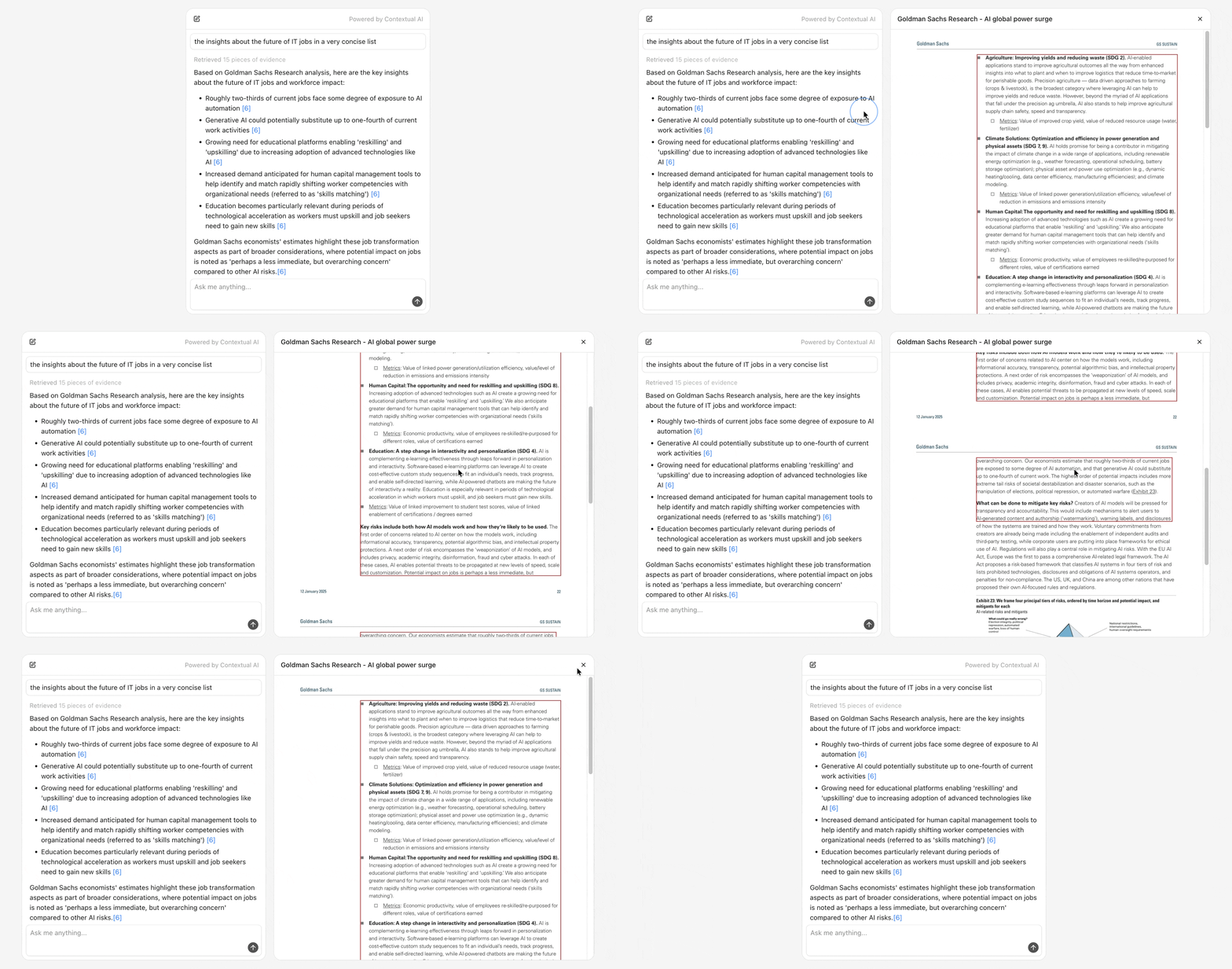
Previewing a retrieval
Use Oryx.RetrievalPreview.* with a fetcher that turns a contentId and messageId into preview metadata from your backend.
tsx
"use client";

import {
  Oryx,
  type OryxRetrievalPreviewFetcher,
} from "@contextualai/oryx-react";

// ---------- Build a fetcher ----------

const fetcher: OryxRetrievalPreviewFetcher = async ({
  contentId,
  messageId,
}) => {
  const res = await fetch(
    `/api/retrieval?contentId=${contentId}&messageId=${messageId}`,
  );
  const data = await res.json();
  return data.content_metadatas?.[0] ?? null;
};

// ---------- Render the preview panel ----------

export function RetrievalPreviewPanel(props: {
  contentId: string;
  messageId: string;
}) {
  return (
    <Oryx.RetrievalPreview.Root
      contentId={props.contentId}
      messageId={props.messageId}
      fetcher={fetcher}
    >
      <Oryx.RetrievalPreview.Loading>
        <div>Loading preview...</div>
      </Oryx.RetrievalPreview.Loading>

      <Oryx.RetrievalPreview.Error>
        <Oryx.RetrievalPreview.ErrorMessage />
      </Oryx.RetrievalPreview.Error>

      <Oryx.RetrievalPreview.Content>
        <Oryx.RetrievalPreview.DocumentName />
        <Oryx.RetrievalPreview.Image />
      </Oryx.RetrievalPreview.Content>
    </Oryx.RetrievalPreview.Root>
  );
}
Check out styling guide for more details on how to style the retrieval preview panel.
© 2025 Contextual AI, Inc.
Proudly open sourced under the Apache 2.0 license.